pywatershed notes

A hydrologic model in Python
by pywatershed development team
Version 3.0.0 Extended Release Notes
These are the extended release notes. The official release notes are found here.
Purpose and scope of pywatershed version 3.0.0
These notes summarize the more detailed What’s New for version 3.0.0 in the documentation.
The primary new capabilities introduced in this release are stream temperature
simulation following the PRMS methodology and simulation of irrigated
agriculture based on GSFLOW. Supporting and additional new capabilities
include energy budgets (alongside the existing mass budgets), dynamic
transpiration and frost processes, model restart, and a flexible Output
class for output collection and statistics.
Stream temperature
The new PRMSStreamTemp
and PRMSStreamTempHumidityCBH
classes simulate stream temperature using the PRMS stream temperature
methodology, computing water temperatures based on energy balance in stream
segments. The latter class accepts time-varying humidity inputs on the HRUs
while the former accepts a mean monthly humidity for each segment. Optional
energy flux tracking and budgeting (on by default) computes 11 energy flux
components including advective heat transport, surface energy exchange, and
internal sources.
The stream temperature classes take a stream shade class as input on
initialization, either
PRMSStreamShadeConstant,
which works from summer and winter shade fractions and segment latitude, or
PRMSStreamShadeDynamic,
which computes shade dynamically from topographic and vegetation parameters
using solar geometry calculations, the default PRMS behavior when
stream_temp_shade_flag = 0.
The stream temperature classes also require one of
PRMSHydraulicGeometryFull
or
PRMSHydraulicGeometryWidthOnly
as an upstream process to provide the hydraulic geometry variables needed for
the energy balance. The former computes flow-dependent width, depth, area,
and velocity using power-law relationships; the latter uses PRMS default
values for the depth parameters, matching PRMS 5.2.1 behavior.
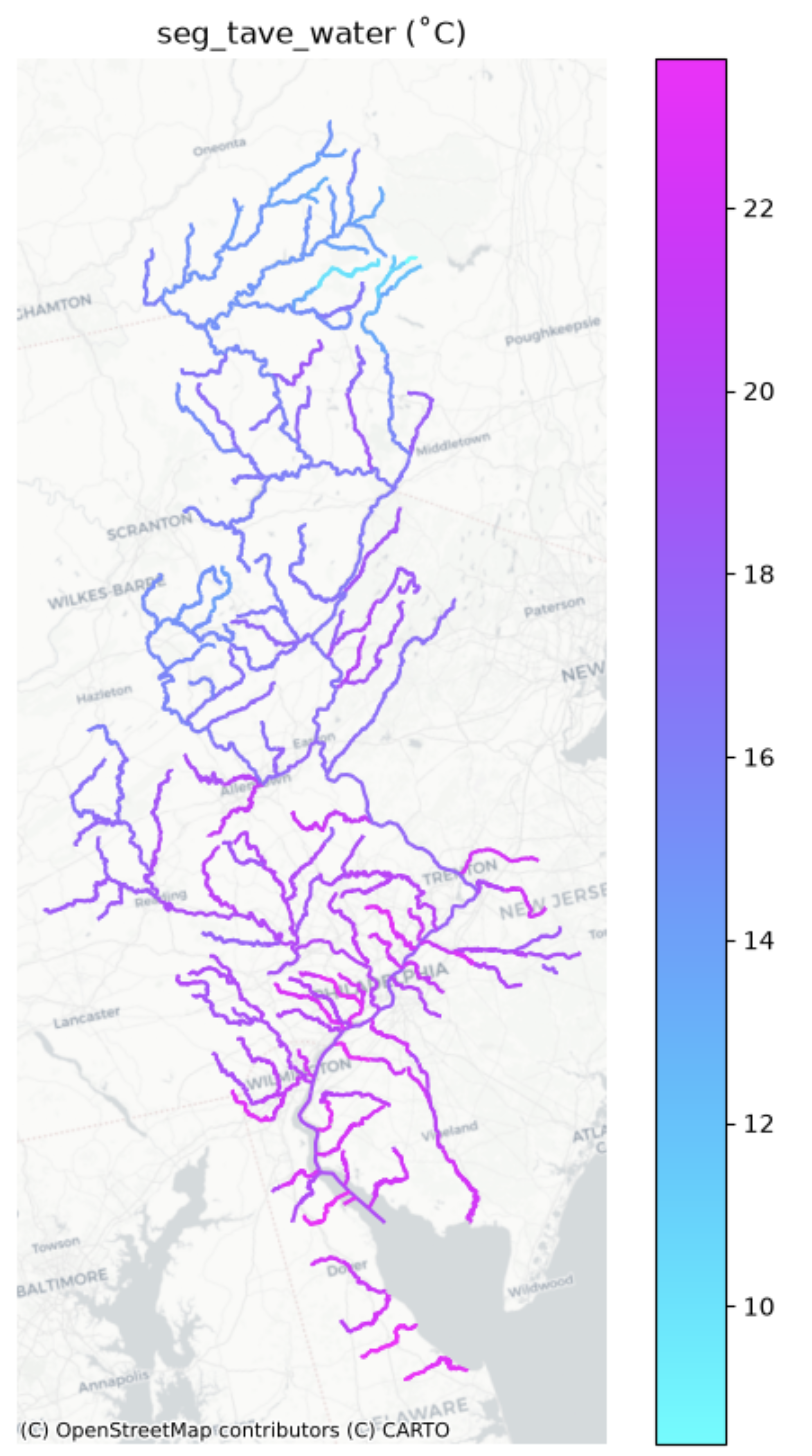
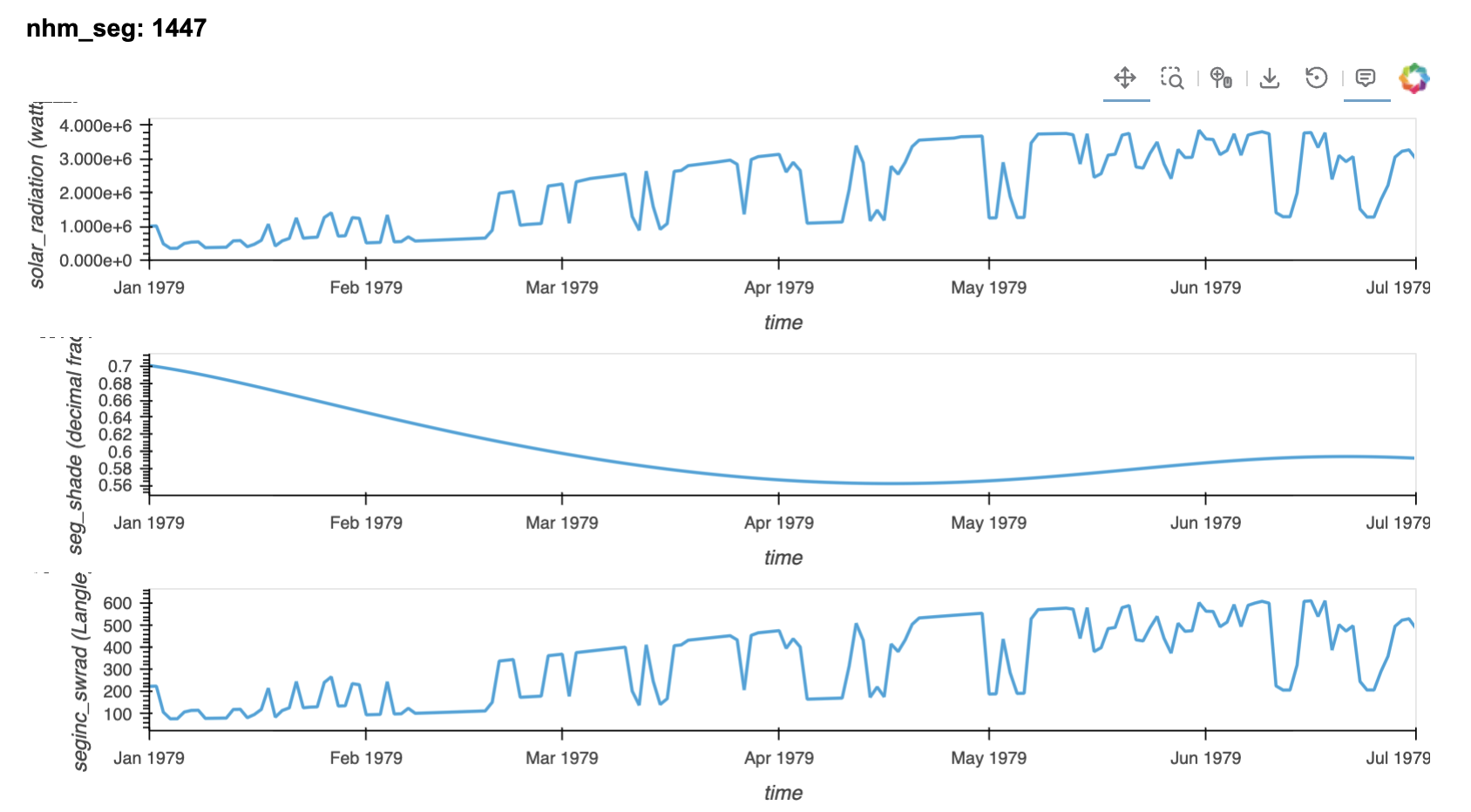
These capabilities are demonstrated as part of the NHM configuration in notebooks 01_multi-process_models.ipynb and 02_prms_legacy_models.ipynb. The figures below show example output created by these notebooks: mean stream temperature on the Delaware River Basin (left) and time series of shade and radiation terms for a single segment (right).
In the course of this work, several bugs were found and corrected in the
stream temperature code of PRMS 5.2.1.1: humidity CBH files were skipped
when selected for use, seg_humid was not zeroed each timestep and
erroneously accumulated, and division by HRU area was repeated multiple
times. The PRMS source contained in the pywatershed repository was corrected
and pywatershed matches the corrected code.
Agricultural water use
New agricultural water use classes enable simulation of irrigated
agriculture based on GSFLOW.
PRMSRunoffAg
extends PRMSRunoff to calculate infiltration separately for pervious and
agricultural areas.
PRMSSoilzoneAgObsET
provides dual-area soil moisture accounting with iterative adjustment of
irrigation to match observed actual evapotranspiration.
PRMSSoilzoneAg
is a simplified version without the observed ET iteration, suitable when ET
observations are not available. These capabilities are demonstrated in a new
example notebook,
10_ag_irrigation_use.ipynb.
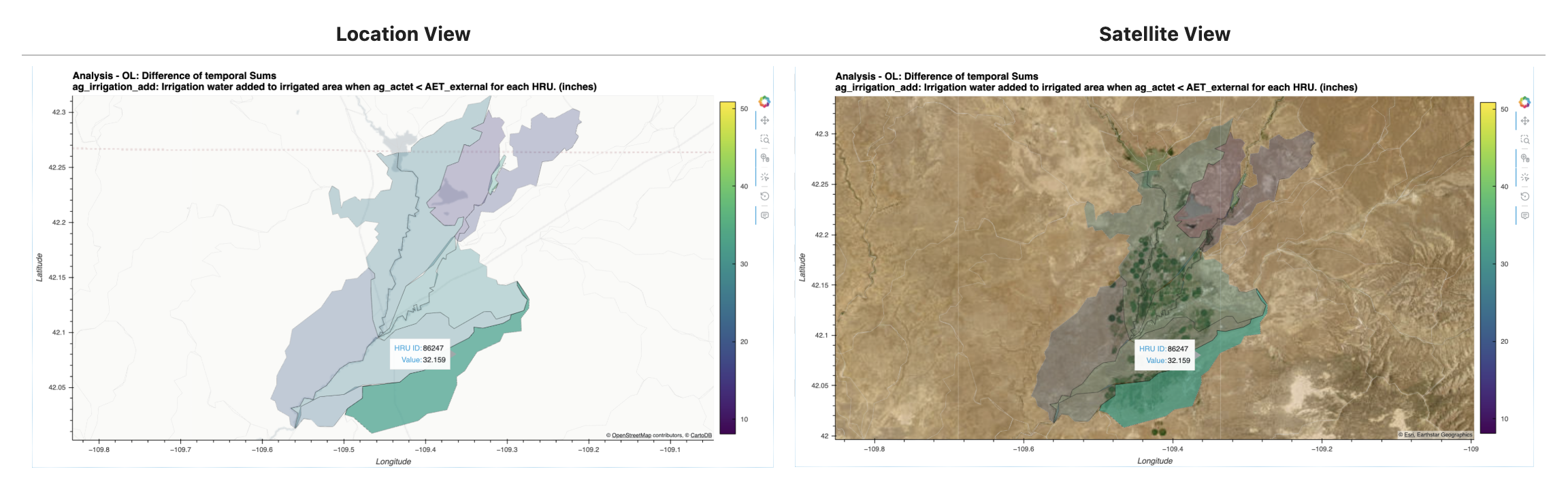
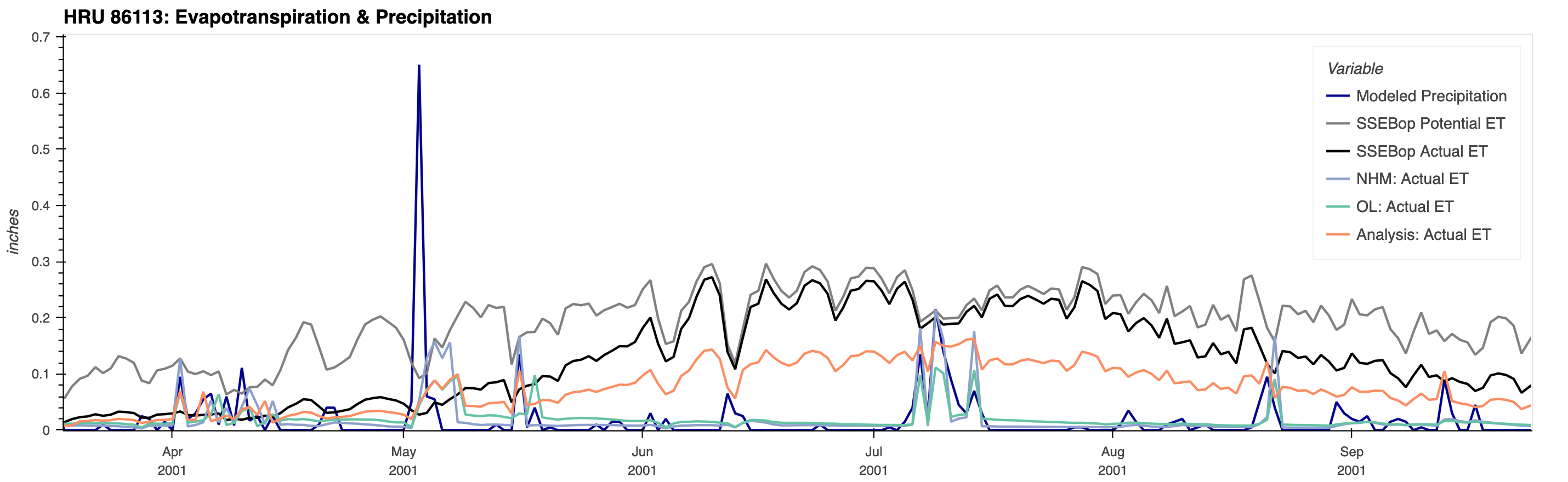
The figures below show example output created by this notebook for an
irrigated agricultural domain. The first shows location and satellite
views of the difference of temporal sums of irrigation water added for
each HRU: the “Analysis” (using the observed-modeled ET iteration) minus
the open-loop run (“OL”, where ET observations are not used to estimate
agricultural water use). The second shows the daily irrigation time
series for a single HRU with (“Analysis”) and without (“OL”) the
iteration. The third figure shows, for one HRU, simulated actual ET (NHM,
“OL”, and “Analysis”) alongside precipitation and SSEBop potential and
actual ET. The SSEBop actual ET serves as the “observed” ET targeted by
the iteration, though it is itself the output of another model rather
than a direct observation.

Energy budgets
The ConservativeProcess
class now supports both mass and energy budgets. The new mass_budget and
energy_budget properties provide explicit access to each budget type. The
legacy budget property is deprecated and will be removed in the next major
release; use mass_budget instead.
Transpiration and frost
PRMSAtmosphereTranspFrost
implements the transp_frost module of PRMS.
PRMSAtmosphereTranspFrostDynamic
extends it to accept dynamic (time-varying) fall and spring frost dates from
PRMS dynamic parameter files, reproducing PRMS/GSFLOW runs with
dyn_fallfrost_flag and/or dyn_springfrost_flag set.
Output collection and statistics
The new Output
class provides flexible output collection and statistical analysis for
models, supporting HRUs of interest, segments/nodes of interest, and monthly
accumulations. It includes Zarr chunked output for efficient large-scale
data writing (roughly 6x faster than NetCDF). See the new example notebook
09_model_output.ipynb.
Model restart
The Process class and its subclasses have a new restart capability,
allowing runs to be split and continued. See the new example notebook
08_restart_streamflow.ipynb.
Additional FlowGraph functionality
- A new
SourceSinkFlowNodeclass adds or removes flow above some minimum flow parameter as specified by an input data file. - The
StarfitSourceSinkFlowNodeallows sources and sinks to interact with storage of a Starfit reservoir/FlowNode. - The
FlowGraphclass has a new methodplotto show an abstract plot of theFlowGraph.
Additional Model and parameter functionality
- The new staticmethod
Model.solve_inputsdetermines where each process input comes from — another process or a file — from a process list or model dictionary, without instantiating aModel. This is useful for determining the file inputs a model configuration requires, for example when forcing a sub-model from another model’s outputs. - The
Modelclass can read all inputs from a single NetCDF file as an alternative to the existing option of a directory containing multiple NetCDF files. - The
load()method ofPrmsParameterssupports reading multiple parameter files, treated as addenda to the first parameter file which contains the dimension information. - The
Controlclass has a new methodset_init_start_timesto manage changing these times.
Breaking Changes
The budget_type parameter has been renamed to imbalance_behavior in
ConservativeProcess and all its subclasses, in FlowGraph, and in control
options. The new name clarifies what the parameter does and is intentionally
distinct from the budget quantity. Budget NetCDF output filenames now
include the quantity type: mass budgets are named
ProcessName_mass_budget.nc instead of ProcessName_budget.nc, and energy
budgets use ProcessName_energy_budget.nc.