USGS dataretrieval Python Package get_gwlevels() Examples
This notebook provides examples of using the Python dataretrieval package to retrieve groundwater level data for a United States Geological Survey (USGS) monitoring site. The dataretrieval package provides a collection of functions to get data from the USGS National Water Information System (NWIS) and other online sources of hydrology and water quality data, including the United States Environmental Protection Agency (USEPA).
Install the Package
Use the following code to install the package if it doesn’t exist already within your Jupyter Python environment.
[1]:
!pip install dataretrieval
Requirement already satisfied: dataretrieval in /opt/hostedtoolcache/Python/3.13.13/x64/lib/python3.13/site-packages (0.1.dev1+gf10f08b77)
Requirement already satisfied: requests in /opt/hostedtoolcache/Python/3.13.13/x64/lib/python3.13/site-packages (from dataretrieval) (2.33.1)
Requirement already satisfied: pandas<4.0.0,>=2.0.0 in /opt/hostedtoolcache/Python/3.13.13/x64/lib/python3.13/site-packages (from dataretrieval) (3.0.2)
Requirement already satisfied: numpy>=1.26.0 in /opt/hostedtoolcache/Python/3.13.13/x64/lib/python3.13/site-packages (from pandas<4.0.0,>=2.0.0->dataretrieval) (2.4.4)
Requirement already satisfied: python-dateutil>=2.8.2 in /opt/hostedtoolcache/Python/3.13.13/x64/lib/python3.13/site-packages (from pandas<4.0.0,>=2.0.0->dataretrieval) (2.9.0.post0)
Requirement already satisfied: six>=1.5 in /opt/hostedtoolcache/Python/3.13.13/x64/lib/python3.13/site-packages (from python-dateutil>=2.8.2->pandas<4.0.0,>=2.0.0->dataretrieval) (1.17.0)
Requirement already satisfied: charset_normalizer<4,>=2 in /opt/hostedtoolcache/Python/3.13.13/x64/lib/python3.13/site-packages (from requests->dataretrieval) (3.4.7)
Requirement already satisfied: idna<4,>=2.5 in /opt/hostedtoolcache/Python/3.13.13/x64/lib/python3.13/site-packages (from requests->dataretrieval) (3.13)
Requirement already satisfied: urllib3<3,>=1.26 in /opt/hostedtoolcache/Python/3.13.13/x64/lib/python3.13/site-packages (from requests->dataretrieval) (2.6.3)
Requirement already satisfied: certifi>=2023.5.7 in /opt/hostedtoolcache/Python/3.13.13/x64/lib/python3.13/site-packages (from requests->dataretrieval) (2026.4.22)
Load the package so you can use it along with other packages used in this notebook.
[2]:
from IPython.display import display

from dataretrieval import nwis
import dataretrieval.waterdata as waterdata
Basic Usage
The dataretrieval package has several functions that allow you to retrieve data from different web services. This examples uses the get_gwlevels() function to retrieve groundwater level data from USGS NWIS. The following arguments are supported:
Arguments (Additional parameters, if supplied, will be used as query parameters)
sites (string or list of strings): A list of USGS site identifiers for which to retrieve data.
start (string): The beginning date for a period for which to retrieve data. If the waterdata parameter begin_date is supplied, it will overwrite the start parameter (defaults to ‘1851-01-01’)
end (string): The ending date for a period for which to retrieve data. If the waterdata parameter end_date is supplied, it will overwrite the end parameter.
Example 1: Get groundwater level data for a single monitoring site.
[3]:
# Set the parameters needed to retrieve data
site_id = "434400121275801"

# Retrieve the data
data = waterdata.get_field_measurements(monitoring_location_id=site_id)
print("Retrieved " + str(len(data[0])) + " data values.")
Retrieved 0 data values.
Interpreting the Result
The result of calling the get_gwlevels() function is an object that contains a Pandas data frame and an associated metadata object. The Pandas data frame contains the data requested. The data frame is indexed by the dates associated with the data values.
Once you’ve got the data frame, there’s several useful things you can do to explore the data.
Display the data frame as a table
[4]:
display(data[0])
| geometry | field_measurements_series_id | field_visit_id | parameter_code | monitoring_location_id | observing_procedure_code | observing_procedure | value | unit_of_measure | time | qualifier | vertical_datum | approval_status | measuring_agency | last_modified | control_condition | measurement_rated | field_measurement_id |
|---|
Show the data types of the columns in the resulting data frame.
[5]:
print(data[0].dtypes)
geometry                               object
field_measurements_series_id           object
field_visit_id                         object
parameter_code                         object
monitoring_location_id                 object
observing_procedure_code               object
observing_procedure                    object
value                                   int64
unit_of_measure                        object
time                            datetime64[s]
qualifier                              object
vertical_datum                         object
approval_status                        object
measuring_agency                       object
last_modified                   datetime64[s]
control_condition                      object
measurement_rated                      object
field_measurement_id                   object
dtype: object
Get summary statistics for the daily streamflow values.
[6]:
data[0]["value"].describe()
[6]:
count    0.0
mean     NaN
std      NaN
min      NaN
25%      NaN
50%      NaN
75%      NaN
max      NaN
Name: value, dtype: float64
Make a quick time series plot.
[7]:
ax = data[0].plot(x="time", y="value", style=".")
ax.set_xlabel("Date")
ax.set_ylabel("Water Level (feet below land surface)")
[7]:
Text(0, 0.5, 'Water Level (feet below land surface)')
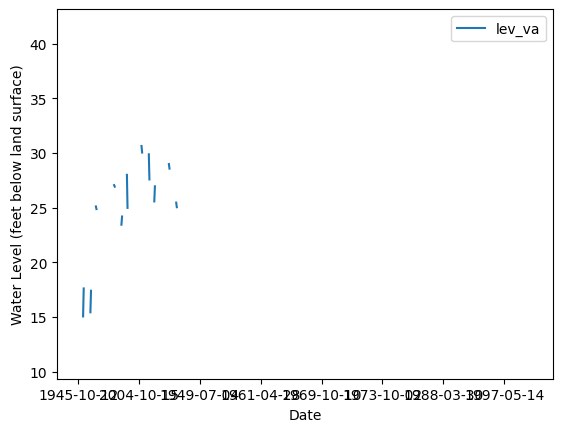
The other part of the result returned from the get_gwlevels() function is a metadata object that contains information about the query that was executed to return the data. For example, you can access the URL that was assembled to retrieve the requested data from the USGS web service. The USGS web service responses contain a descriptive header that defines and can be helpful in interpreting the contents of the response.
[8]:
print("The query URL used to retrieve the data from NWIS was: " + data[1].url)
The query URL used to retrieve the data from NWIS was: https://api.waterdata.usgs.gov/ogcapi/v0/collections/field-measurements/items?monitoring_location_id=434400121275801&skipGeometry=False&limit=50000
Additional Examples
You can also request data for multiple sites at the same time.
Example 2: Get data for multiple sites. Site numbers are specified using a comma delimited list of strings.
[9]:
site_ids = ["434400121275801", "375907091432201"]
data2 = waterdata.get_field_measurements(monitoring_location_id=site_ids)
print("Retrieved " + str(len(data2[0])) + " data values.")
display(data2[0])
Retrieved 0 data values.
| geometry | field_measurements_series_id | field_visit_id | parameter_code | monitoring_location_id | observing_procedure_code | observing_procedure | value | unit_of_measure | time | qualifier | vertical_datum | approval_status | measuring_agency | last_modified | control_condition | measurement_rated | field_measurement_id |
|---|
The following example is the same as the previous example but with multi index turned off (multi_index=False)
[10]:
site_ids = ["434400121275801", "375907091432201"]
data2 = waterdata.get_field_measurements(monitoring_location_id=site_ids, )
print("Retrieved " + str(len(data2[0])) + " data values.")
display(data2[0])
Retrieved 0 data values.
| geometry | field_measurements_series_id | field_visit_id | parameter_code | monitoring_location_id | observing_procedure_code | observing_procedure | value | unit_of_measure | time | qualifier | vertical_datum | approval_status | measuring_agency | last_modified | control_condition | measurement_rated | field_measurement_id |
|---|
Some groundwater level data have dates that include only a year or a month and year, but no day.
Example 3: Retrieve groundwater level data that have dates without a day.
[11]:
data3 = waterdata.get_field_measurements(monitoring_location_id="425957088141001")
print("Retrieved " + str(len(data3[0])) + " data values.")

# Print the date/time index values, which show up as NaT because
# the dates can't be converted to a date/time data type
print(data3[0].index)
Retrieved 0 data values.
RangeIndex(start=0, stop=0, step=1)
If you want to see the USGS RDB (delimited text) version of the data just retrieved, you can get the URL for the request that was sent to the USGS web service.
[12]:
# Print the URL used to retrieve the data
print("You can examine the data retrieved from NWIS at: " + data3[1].url)
You can examine the data retrieved from NWIS at: https://api.waterdata.usgs.gov/ogcapi/v0/collections/field-measurements/items?monitoring_location_id=425957088141001&skipGeometry=False&limit=50000
You can also retrieve data for a site within a specified time window by specifying a start date and an end date.
Example 4: Get groundwater level data for a site between a startDate and endDate.
[13]:
data4 = waterdata.get_field_measurements(monitoring_location_id=site_id, time="1980-01-01/2000-12-31")
print("Retrieved " + str(len(data4[0])) + " data values.")
Retrieved 0 data values.